Create an NFT Marketplace #
This guide is for collection owners and communities that want a dedicated marketplace for an ERC-721 collection. Once created, holders can list, reprice, and cancel listings, while buyers can connect a wallet and purchase NFTs.
Availability depends on the network shown on the creation page. For your first market, complete the full flow on a test network with a test NFT and a small balance.
Explore the live demo first: Open the BNB Chain NFT marketplace demo to see the marketplace home, NFT details, listing, and purchase flow before creating your own.
1. What you need #
Prepare the following before you start:
- Creator wallet: pays the creation fee and becomes the first market administrator.
- NFT contract address: must be an ERC-721 contract on the selected network. ERC-1155 is not supported.
- Settlement asset: the currency buyers use to purchase NFTs.
- Project fee wallet: receives the project commission from completed sales.
- Project profile: logo, name, description, website, and social links.
- Native coin balance: covers the creation fee and wallet transaction fee.
Make sure the network shown in the website header matches the network selected in your wallet. The same address on a different network represents a different asset.
2. Understand the key settings #
Settlement asset #
The settlement asset is what buyers pay with.
- Native coin: for example, BNB on BNB Chain.
- Common token: select one of the recognized tokens shown by the page.
- Other ERC-20 token: enter its contract address and wait for the name, symbol, and decimals to appear.
You can change the default later. The new choice applies only to listings created after the change; existing listings keep their original currency.
Project commission #
The project commission is sent to the project fee wallet when a sale completes. The default is 5%, the maximum is 20%, and up to two decimal places are supported.
Example: at 5%, a sale priced at 1 BNB produces a 0.05 BNB project commission. Always review the final fee breakdown shown before a transaction.
Royalty #
Royalty can continuously reward the NFT creator.
- If the page recognizes a royalty rule provided by the NFT, that option is shown.
- If no rule is recognized, royalty is off by default.
- You may enable a custom royalty of up to
15%and provide a royalty wallet.
Project commission and royalty are separate. Higher combined fees reduce what the seller receives, so disclose them clearly to your community.
3. Step 1: Select the NFT and settlement asset #
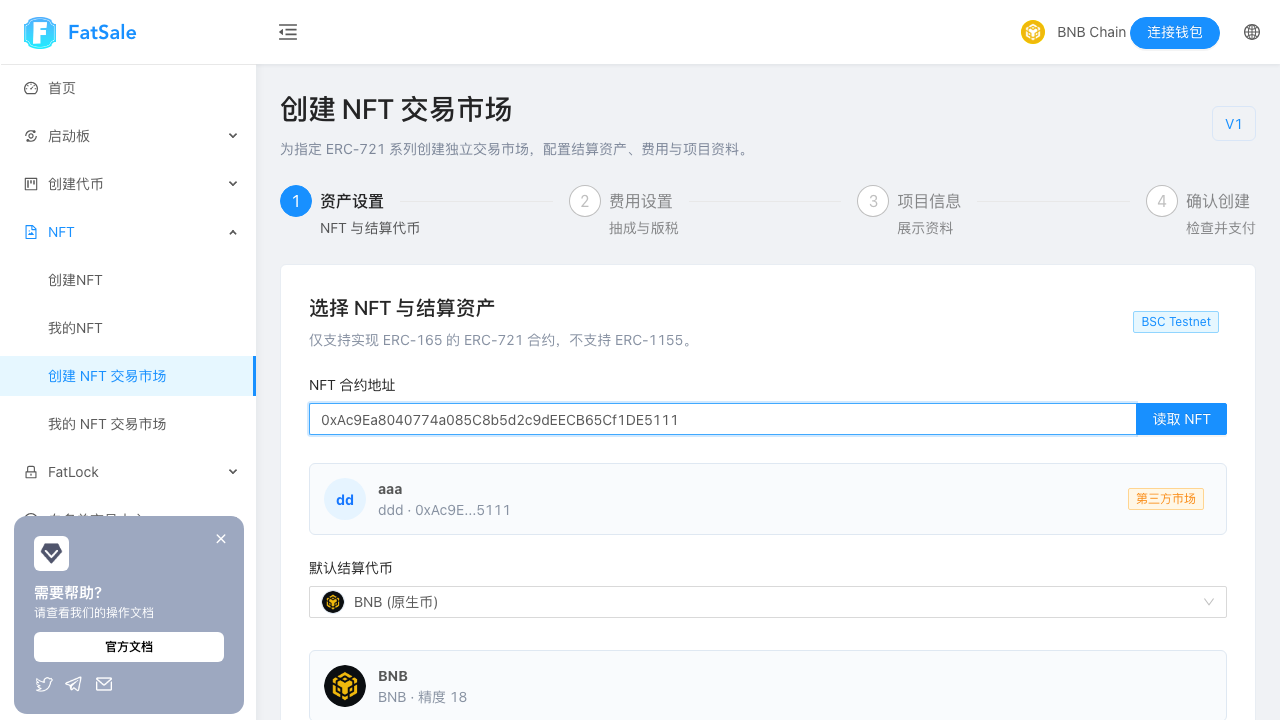
Read the NFT #
- Paste the full NFT contract address.
- The page will try to read it automatically. You can also click Load NFT.
- Verify the collection name, symbol, and shortened address.
The page also identifies the market type:
| Type | Meaning |
|---|---|
| Collection market | The creator wallet matches the collection administrator. |
| Third-party market | The creator wallet is not the collection administrator. Users should verify the full NFT and market addresses before trading. |
Select the default currency #
Choose a currency from the list. For a custom ERC-20 token:
- Select Other ERC-20 token;
- enter the token contract address;
- wait for its name, symbol, and decimals;
- continue only after the details are correct.
Avoid fee-on-transfer, deflationary, or otherwise unusual tokens as settlement assets. They may cause purchases to fail because the received amount differs from the quoted amount.
4. Step 2: Configure transaction fees #
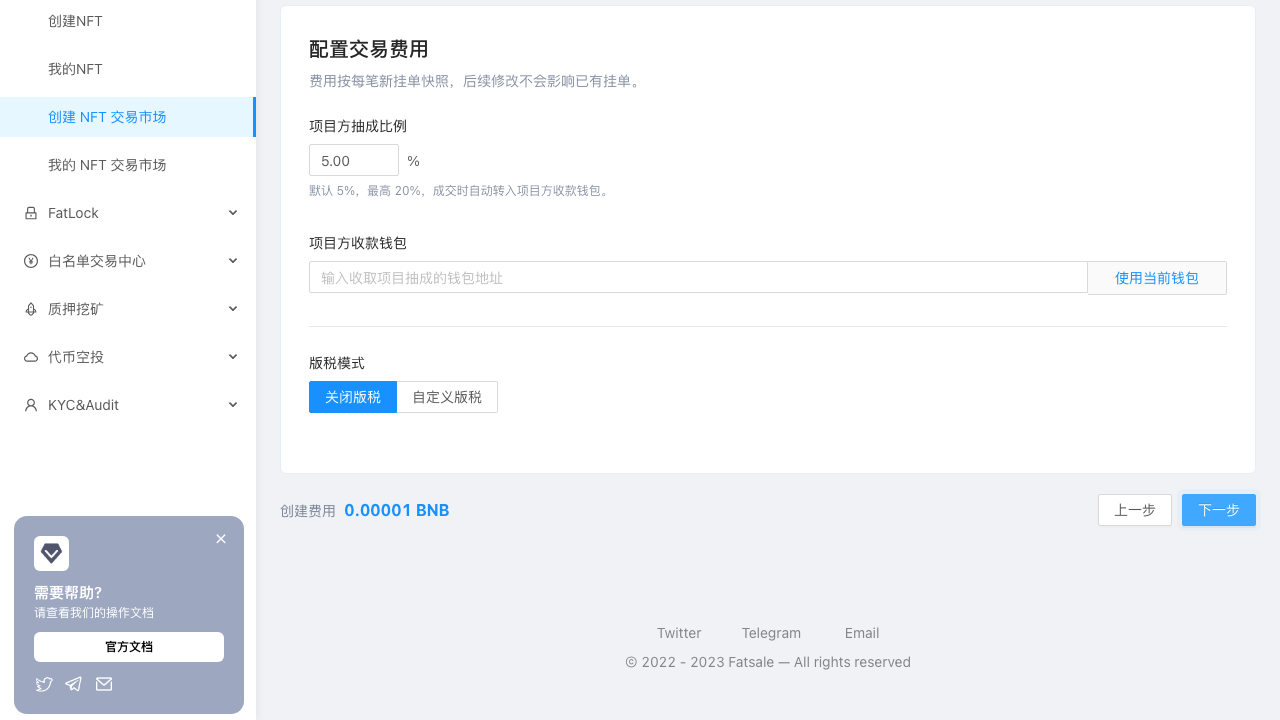
Set the project commission #
Enter a percentage. 5.00 means 5%, not five tokens.
Recommendations:
- use the default
5%for a first test; - publish the fee policy before opening a production market;
- avoid an unnecessarily high fee that discourages holders from listing.
Enter the fee recipient #
Paste the wallet address or click Use current wallet. Verify the first and last characters before continuing. You can change it later, but the change only affects new listings.
Choose royalty mode #
- Royalty off: no separate royalty is charged.
- NFT royalty: appears only when the page confirms it is available.
- Custom royalty: enter a percentage and recipient wallet.
The creation fee remains visible next to the navigation buttons on every step.
5. Step 3: Add the project profile #
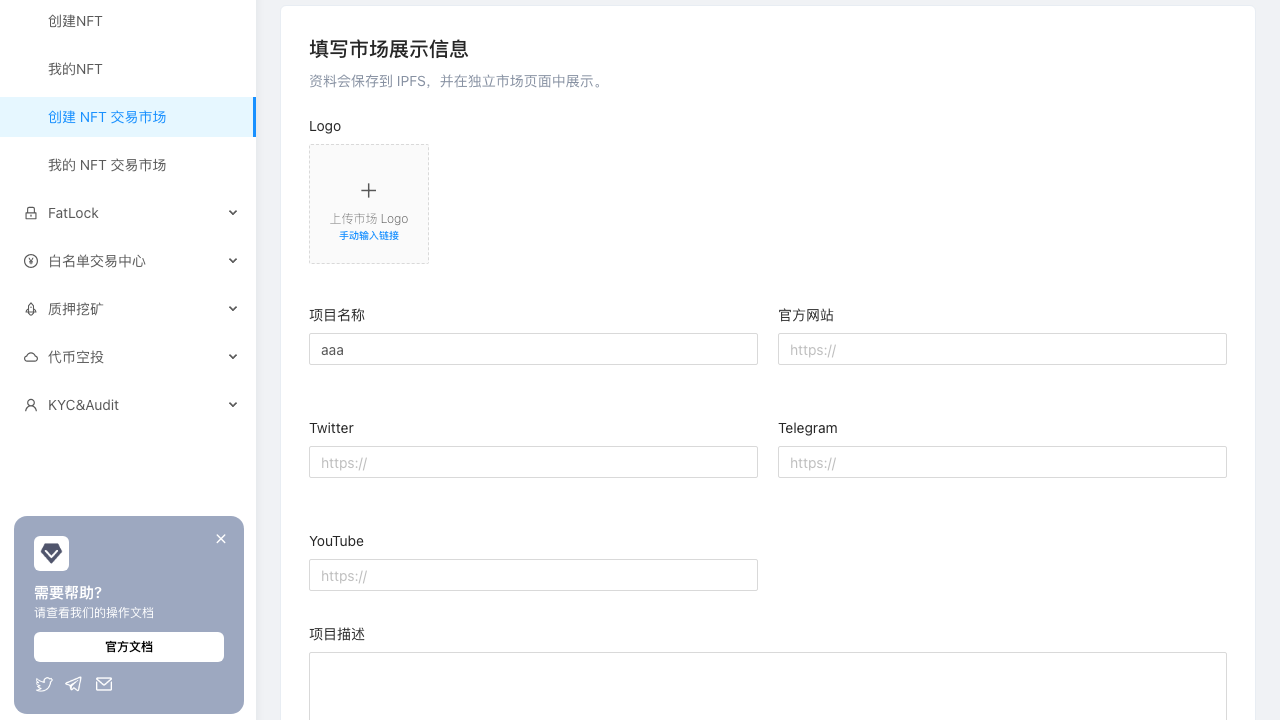
These details appear on the dedicated marketplace page.
| Field | Recommendation |
|---|---|
| Logo | Upload a clear square image, ideally at least 512 × 512. |
| Project name | Use the official name recognized by your community. |
| Website | Enter a complete https:// URL. |
| Use the official project account link. | |
| Telegram | Use the official group or channel link. |
| YouTube | Optional official channel or introduction video. |
| Description | Explain the project, NFT utility, and community information. Line breaks are supported. |
All external links must start with http:// or https://. Wait until the logo upload is complete before continuing.
6. Step 4: Review and create #
Review all information carefully:
- NFT name, symbol, and contract address;
- default settlement asset;
- project commission and recipient wallet;
- royalty mode and recipient;
- creation fee shown by the current page;
- project name, logo, and external links.
The creation fee can change over time. Use the amount currently displayed by the page, not the value in a screenshot or an older announcement.
Click Confirm creation to open the final confirmation dialog:
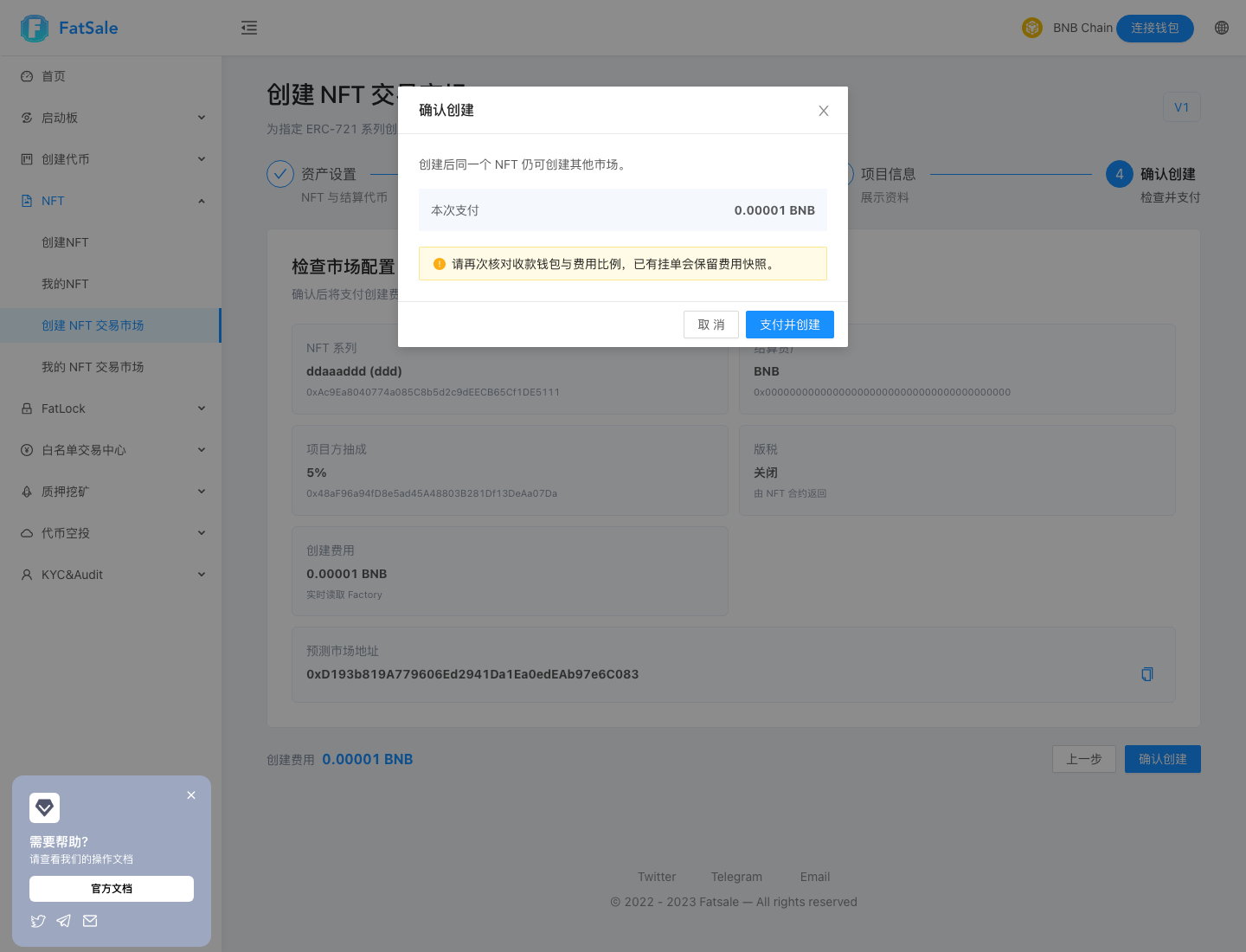
Check the payment amount and wallets, then click Pay and create and approve the transaction in your wallet. Keep the page open and do not switch networks until the success message appears.
7. After creation #
The success dialog shows the new market address and two actions:
- View details opens the dedicated marketplace;
- View my NFT marketplaces returns to the list of markets created by the connected wallet.
One NFT collection may have multiple markets. Publish one verified market link through your official website and social channels, and ask users to verify the full market address.
Recommended post-launch checks:
- verify the logo, name, description, and links;
- test listing and cancellation with a low-value NFT;
- complete one small purchase from a second wallet;
- verify the project fee wallet;
- protect the administrator wallet and never share its seed phrase or private key.
8. FAQ and troubleshooting #
The page says the current network is unavailable #
Switch to a network supported by the creation page and switch your wallet to the same network. Refresh the page after switching if necessary.
NFT information does not appear automatically #
Check that the address is complete, the NFT is on the selected network, and it is ERC-721 rather than ERC-1155 or a regular token. Click Load NFT to retry. A slow network connection may require a few extra seconds.
The page says the address is not a supported NFT #
The address may be incorrect, deployed on another network, or not an ERC-721 contract. Copy the contract address from a trusted block explorer, not from a holder wallet or transaction page.
A custom settlement token cannot be read #
Confirm that the token is on the same network as the NFT. If the token has unusual transfer behavior, use the native coin or a common standard token instead.
Why is the NFT royalty option missing? #
The page did not recognize an available royalty rule. Keep royalty off or choose a custom royalty and recipient wallet.
Use current wallet does not fill the address #
Connect the wallet first and confirm that its shortened address appears in the header. Disconnect and reconnect if the field remains empty.
I cannot continue to the final review #
Check the logo upload, project name, external link format, fee recipient, and royalty recipient. The page normally shows the missing or invalid field in a notification.
My wallet says the balance is insufficient #
The wallet needs enough native coin for both the creation fee and the network transaction fee. A balance in the settlement token cannot pay the network fee.
I approved the wallet transaction, but the page is still waiting #
Do not submit a duplicate transaction. Check the wallet activity or block explorer. If it is pending, wait; if it failed, correct the reported issue; if it succeeded, refresh My NFT Marketplaces.
The market was created but is missing from my list #
Connect the same wallet and network used during creation, then refresh. If the transaction has only just confirmed, wait briefly. Keep the transaction hash when contacting support.
I entered the wrong project fee or profile information #
The market administrator can update the default currency, profile, project commission, recipient, and royalty later. Changes apply to new listings only. Sellers must cancel and recreate older listings to use the new settings.