Fatsale One-Click Token Creation Guide #
Fatsale supports token creation on BSC mainnet, BSC testnet, and multiple other chains. Token templates include tax templates, dividend templates, and other common tokenomics models. You can create your own token within minutes.
As of April 13, 2024, the Goerli testnet has stopped producing blocks. Please use the BSC testnet guide for testing.
The video guide has been uploaded to YouTube. You can subscribe to the Fatsale channel for updates.
If you are creating a token on BSC mainnet, you can skip directly to step 3.
We recommend using desktop Google Chrome with the
MetaMaskextension.
If you are creating a token on mobile, use TP Wallet. Configure the network according to your wallet’s own guide, then skip directly to step 3. Fatsale supports mobile pages.
1. Configure the Goerli Testnet #
Install MetaMask.
Download link: https://metamask.io/
We recommend using Chrome and installing the MetaMask extension. The download page includes a detailed installation guide.

Configure the Goerli testnet.
- Select the built-in
Goerli Test Network.

If your MetaMask does not show this option, add it manually:
Network name: Goerli Test Network
RPC: https://goerli.infura.io/v3/
Chain ID: 5
Currency symbol: GoerliETH
Block explorer: https://goerli.etherscan.io
2. Get Test Coins #
This old guide listed three ways to obtain test ETH. Because Goerli has stopped producing blocks, these options are kept only for historical reference.
Fatsale test-coin bot
Fatsale previously prepared a small amount of test ETH for users. Users could DM
@FatSaleGoerliBOTon Telegram with their wallet address and receive0.02 ETHevery 48 hours.Note: test ETH had no real value. Users should not abuse faucet resources.

Public faucet
Users could visit a faucet, register, log in, and claim about
0.02test ETH.Faucet URL: https://goerlifaucet.com/
Paid test account
This option was listed only to help users obtain test coins quickly. It had no business relationship with Fatsale.
Link: https://zhanghao.btc666.cc/
After purchasing, users were advised to transfer the test ETH to their own address and never reuse that account.

3. Create a Token #
Confirm that MetaMask is connected to the Goerli testnet, then open the Fatsale website: https://fatsale.org/
Fill in the basic token information: full name, symbol, decimals, and total supply. In wallets and Swap pages, the token symbol is usually the main displayed name.

Select a token template. This guide uses the commonly used tax and liquidity-backflow template. During trading, this template charges a tax, adds part of the collected tokens back into liquidity, and can send part of the fee to the marketing wallet for project operations.

Tax explanation:
- Burn tax: a specified portion of tokens in each trade is sent to the dead address, creating a deflationary effect.
- Liquidity-backflow tax: a specified portion of tokens is automatically added into the liquidity pool so trading liquidity remains available.
- Marketing tax: a specified portion of tokens is automatically sent to the marketing wallet for project use.
- Buy tax must not exceed
25%, and total transaction tax must not exceed50%. Tokens that meet these limits can apply for thesafulabel on Fatsale or other presale platforms.
Fill in the required information for the selected template. You can configure maximum transaction amount, maximum wallet holding, and other parameters. Each item has its own explanation. If you have questions, join the Fatsale official group for help.

Click confirm to create the token. The page estimates the creation fee and the token address to be generated. You can click
Changeto generate another address, or use the vanity generator to generate an address you like. Contract vanity generation only supports characters0-9anda-f.

Because this is a testnet, advanced users can manually select a low gas price to save gas, such as
0.1 gweiin advanced settings. Do not do this on mainnet.
Confirm the transaction. After creation is complete, the page automatically redirects to the console. The left side of the console shows token information and tokenomics, while the right side is the control panel where you can renounce ownership, adjust tax rates, and perform other operations.

If you close the page and want to enter the console again, go to the
Create Tokenpage and clickEnter Consolein the upper-left corner. You will see all tokens you created. Click the corresponding token to enter its console.
4. Add Liquidity #
In this example, the pool token selected during token creation is ETH, and the exchange is Uniswap. Open Uniswap at https://app.uniswap.org/#/swap. Because MetaMask is connected to Goerli, Uniswap will switch to the corresponding testnet context automatically.

Because the token has tax, it needs to be added to a Uniswap V2 pool.


Click
Add Liquidityand add liquidity for the token you just created. The pool token isETH.
Click
ApproveandSupplyto complete the liquidity addition.
The first liquidity addition sets the initial price. For example, if you add
0.0001 ETHand100000000000test tokens into the pool, the price of one test token is0.0001 / 100000000000 ETH.5. Open Trading #
Normally, after liquidity is added, the token can trade on the Swap. However, in this example,
Manual Open Tradingwas enabled during token creation, so you need to return to the console and manually clickOpen Tradingon the right side.The benefit of
Manual Open Tradingis that you can calculate the price in advance, add liquidity, and open trading with one click at launch. If you created a presale for the token, you can first finalize the presale and let users claim their tokens, then manually open trading. Otherwise, the token may become freely tradable immediately when the presale is finalized.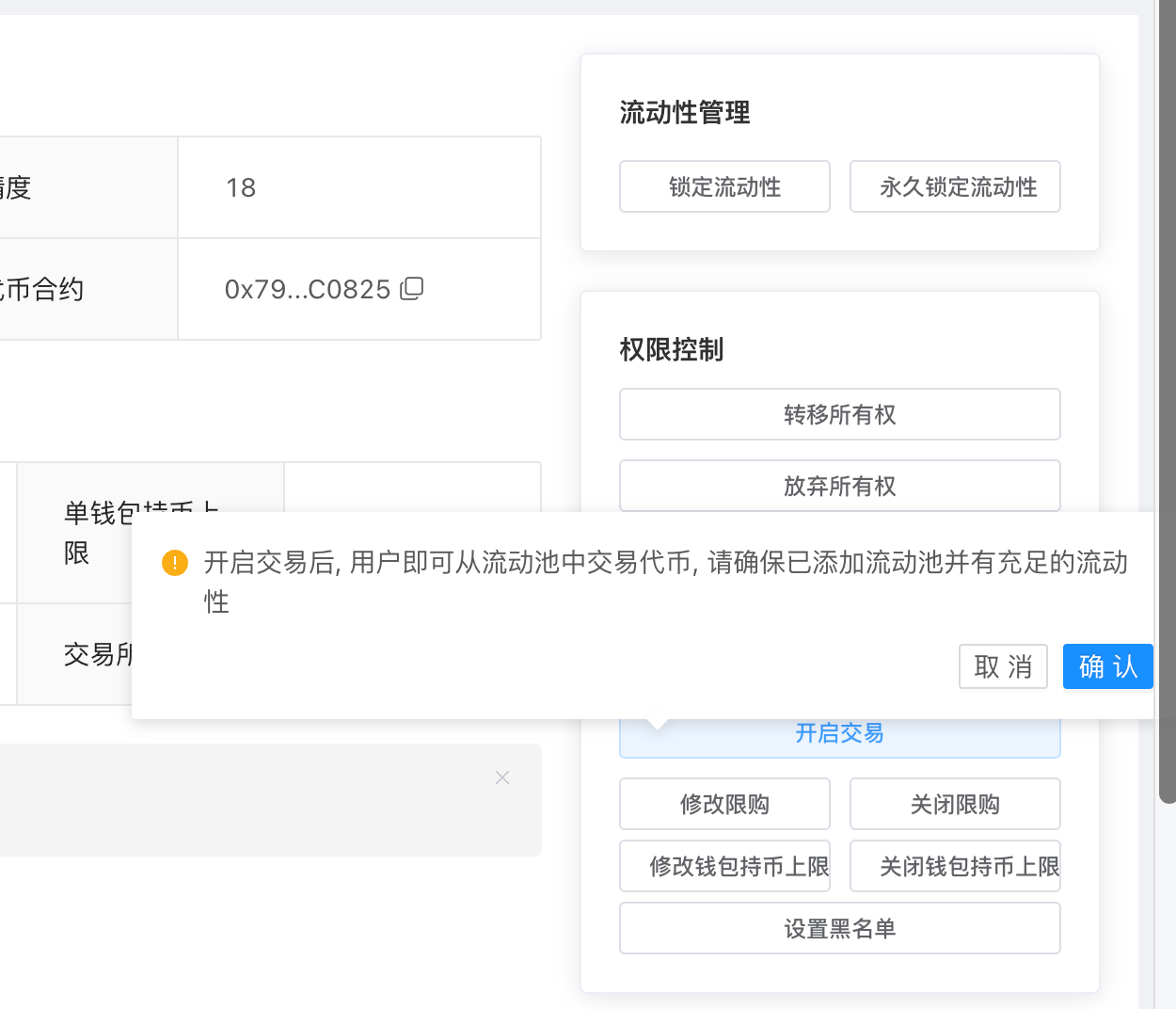
After opening trading, return to Uniswap and the token can trade normally.
6. Other Settings #
In addition to manual trading open, Fatsale provides
Liquidity Settings,Tax Settings,Ownership Settings, and other configuration panels.
- Liquidity settings: liquidity can be locked. In future versions, adding or removing liquidity directly from the backend will be supported so users do not need to enter PancakeSwap or Uniswap manually.
- Tax settings: manually adjust each tax rate.
- Ownership settings: transfer ownership or permanently renounce ownership. After renouncing ownership, you lose all control over the token and cannot recover it.
All token contracts used by
Fatsalehave passed audits, contain no hidden backdoors, meet theSafustandard, and cannot become honeypot contracts. Fatsale will continue cooperating with more token-checking tools to provide more accurate query results.
- Select the built-in